Your website has a front door.
It has a sign.
It has a reception area.
It has a carefully written message telling visitors what to do next.
And then there’s your contact form.
That tiny box asking for a name, email address, and message might look harmless.
But to the internet, it can be something very different.
It can be an open doorway.
And if nobody is checking who walks through it, your contact form can quickly become the busiest—and most annoying—part of your website.
The Strange Life of a Contact Form
Imagine running a physical business.
A person walks through your front door and says:
“Hi, I’d like to talk to someone about your services.”
Great.
Another person walks in:
“We'd love to publish your casino article.”
Then another:
“Buy our SEO backlinks.”
Then:
“Dear Sir/Madam, we have a revolutionary opportunity…”
Then another 37 people walk in saying roughly the same thing.
Nobody invited them.
Nobody knows who they are.
And your receptionist has to deal with every single one.
That sounds ridiculous in the real world.
Online?
It happens every day.
Your website form doesn't know whether the person submitting it is a potential customer, an SEO agency pitching backlinks, a bot testing your form, or someone trying to inject unwanted content into your inbox.
It simply sees:
Form submitted.
And that is where the problem begins.
Your Form Doesn't Know What "Important" Means
This is one of the biggest misunderstandings about contact forms.
A form is designed to collect information.
It isn't necessarily designed to understand information.
Consider these two messages:
“Hi, I found your website and would like to know how much a new ecommerce website would cost.”
and:
“Hello dear, we are leading digital marketing company. We can provide high-quality backlinks at affordable prices…”
Technically, both are valid form submissions.
Both contain words.
Both contain an email address.
Both successfully passed through your form.
But only one is probably a lead.
This is the problem with treating every submission equally.
A successful submission isn't automatically a useful submission.
The Hidden Cost of "Just a Little Spam"
Most businesses don't immediately think of spam as a serious problem.
After all, deleting a few annoying emails takes only a few seconds.
But the cost isn't necessarily the deletion.
It's the interruption.
Imagine receiving 20 spam submissions a day.
That's more than 7,000 unwanted messages a year.
Now imagine someone on your team opening, reading, interpreting, deleting, and mentally processing those messages.
The cost starts to look different.
And there's another problem.
Real leads don't always arrive with perfect timing.
A genuine enquiry might arrive between 15 spam messages.
Then another.
Then another.
Eventually, people start scanning instead of reading.
And when humans start scanning, something important can happen:
a real enquiry can look like just another message.
That's when spam stops being an annoyance and starts becoming a lead-management problem.
The Most Dangerous Spam Isn't Always Obvious
Some spam is easy to identify.
You don't need advanced technology to recognise:
“BUY CHEAP BACKLINKS!!!”
But not everything is that obvious.
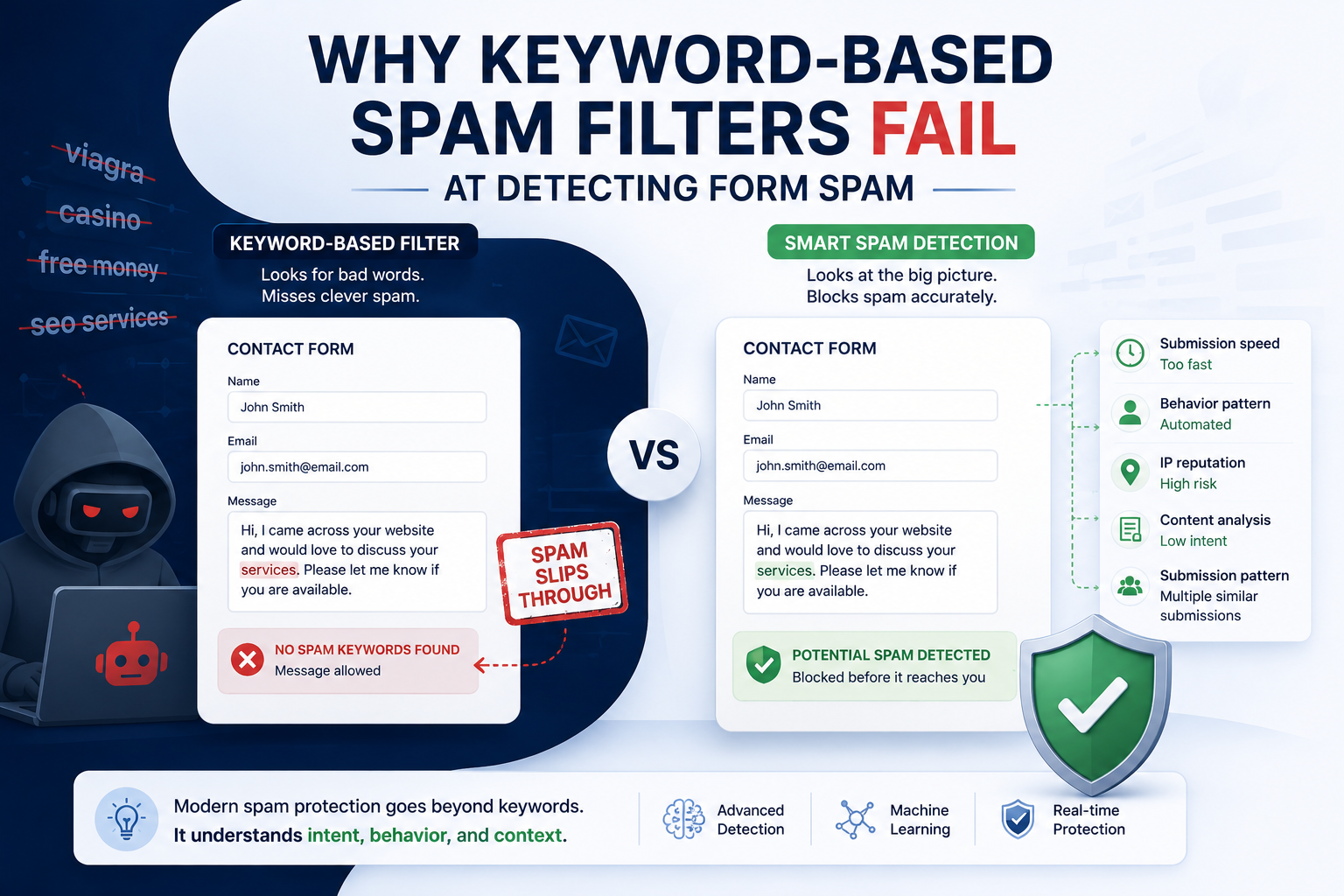
A message might contain:
A realistic name
A normal-looking email address
A polite introduction
A paragraph of seemingly relevant text
A website URL
No obvious spam keywords
It can look perfectly legitimate at first glance.
This is why simply searching for a few "bad words" isn't always enough.
Spam evolves.
And spammers understand that businesses are becoming better at recognising obvious spam.
So the messages evolve with them.
Think of Your Contact Form Like a Nightclub
Here's a better way to think about form protection.
Your contact form is the entrance.
Your email inbox is the nightclub.
Your sales team is inside.
And spam is trying to get through the door.
You could simply lock the door.
That would stop everyone.
Or you could make every visitor solve a puzzle before entering.
That might discourage some unwanted visitors—but it could also annoy genuine customers.
Or you could put someone at the door who actually looks at who's trying to get in.
They don't just ask:
"Did you fill in the form correctly?"
They ask:
"Why are you here?"
That's a much more useful question.
CAPTCHA Asks: "Are You Human?"
CAPTCHA has a useful purpose.
It attempts to determine whether the person—or system—submitting the form is human.
But there's an important distinction:
Being human doesn't automatically mean being a valuable lead.
A real person can submit spam.
A real person can send a backlink pitch.
A real person can send promotional material you never requested.
A human can still be spam.
That means the real question for a business isn't always:
“Is this submission human?”
Sometimes the better question is:
“Is this message actually relevant?”
What If Your Form Could Read the Message?
This is where things get more interesting.
Instead of treating a form submission as simply:
Submitted = Accept
you can think about it more like:
Submitted → Understand → Classify → Route
The message itself becomes part of the decision.
For example:
Message A
“Hi, I'm looking for a quote for a new WordPress website for my construction company. We currently have around 30 pages and would like to discuss rebuilding the site.”
That's probably worth seeing.
Message B
“We are offering premium guest posting opportunities on high-authority websites. Let us know if you are interested.”
Completely different intent.
Message C
“Can you help us improve our Google Ads landing page? We're getting traffic but very few enquiries.”
Again, completely different.
A smart form-protection system should be able to understand those differences.
That's the idea behind SpamForms.
Instead of relying only on CAPTCHA or a giant list of blocked words, SpamForms analyses the intent and context of the message to help identify likely spam.
Genuine enquiries can continue through.
Suspicious submissions can be separated for review.
And your team doesn't have to manually investigate every strange message that arrives.
Spam Doesn't Have to Mean "Delete It"
There's another important distinction.
Blocking spam and deleting spam aren't necessarily the same thing.
Imagine a potentially suspicious message arrives.
You don't necessarily want it permanently destroyed.
Maybe it's unusual.
Maybe it looks suspicious.
Maybe you're not completely sure.
A safer approach can be:
"This looks suspicious. Put it aside and let me decide."
That gives businesses a review layer rather than forcing every message into a simple yes/no decision.
This matters because automated systems aren't perfect.
Neither are humans.
The goal isn't to pretend otherwise.
The goal is to reduce unnecessary noise while keeping businesses in control.
Your Website Might Be Working Harder Than Your Inbox
Here's the ironic part.
Businesses spend thousands of dollars designing websites.
They optimise pages.
They improve SEO.
They run Google Ads.
They create landing pages.
They test headlines.
They optimise conversion rates.
They add calls to action.
And eventually someone clicks:
Submit.
That's the moment all that work is supposed to pay off.
But if the resulting inbox is full of junk, the final step of the customer journey becomes messy.
Your website generated the enquiry.
Your form captured it.
But your inbox still has to figure out whether it matters.
That final step deserves more attention than it usually gets.
The Real Conversion Isn't "Form Submitted"
We often talk about website conversions as if the story ends when someone fills in a form.
It doesn't.
The real journey is closer to:
Visitor → Form → Message → Qualification → Conversation → Customer
Spam can interfere with the middle of that journey.
And that's why protecting your contact forms isn't simply about keeping your inbox tidy.
It's about protecting the path between website traffic and genuine business opportunities.
Your Contact Form Deserves a Security Guard
Your website doesn't need to be hostile to visitors.
It doesn't need five CAPTCHAs.
It doesn't need a 14-field enquiry form.
And it doesn't need to make legitimate customers prove they're human three times.
It simply needs to be better at understanding what comes through the door.
Think of your contact form as the receptionist of your website.
Its job isn't just to collect names.
Its job is to help the right people reach the right team without forcing everyone to fight through a mountain of noise.
That's where modern spam protection can make a difference.
What Happens After Someone Clicks "Submit"?
That's the question worth asking.
Not:
"Did the form work?"
But:
"What happened to the message after it was submitted?"
Did a genuine prospect reach your team?
Did a spam message get mixed into the same inbox?
Did someone waste five minutes sorting it?
Did a suspicious submission get deleted automatically?
Or did it quietly sit there while a real enquiry waited behind it?
The submit button might be the end of the website visitor's journey.
But for your business, it's only the beginning.
Keep the Door Open. Just Know Who's Walking Through It.
Your contact form shouldn't have to choose between being completely open and completely locked down.
There is a middle ground.
Let genuine visitors contact you.
Reduce the noise.
Separate suspicious submissions.
Keep control over what gets reviewed.
And give your team a better chance of seeing the messages that actually matter.
SpamForms is built around exactly that idea: protect your forms without turning them into obstacles for genuine customers.
Because your website worked hard to get the visitor there.
Don't let the last step become the noisiest one.